
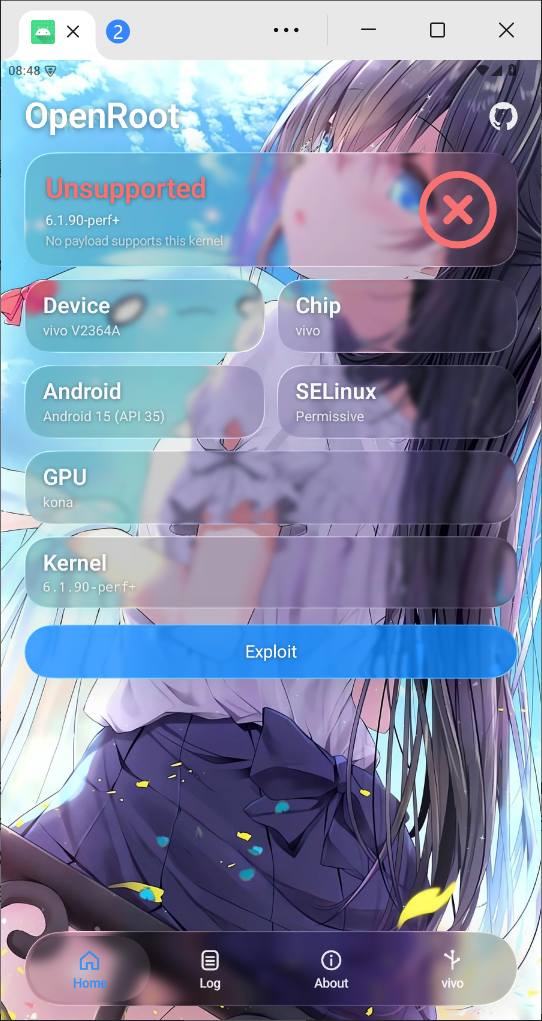
This is a fork of hexo141/OpenRoot, carrying changes made on the fork branch. The base project, its architecture and most of the engines come from there. This fork differs in:
- the vivo wired escalation path is removed (
VivoWired*,vivo_payloads.json,vivo_ksu_activate.sh, thelibksu_vivo_*.soblobs);native-posix/(CVE-2026-98260,cve98260.c) is added, together withCve98260Runner. It sits in the same posix-cpu-timers subsystem asnative-pct/, but it is a different bug: CVE-2026-64560 spends the danglingk_itimerfor a physical read/write primitive before staginginit_cred, while CVE-2026-98260 uses the expiry path's stale node for a one-shot kernel write that clearsselinux_state.enforcingand repointscurrent->cred;boot.imgis parsed in-app (bootimg/:BootImageParser,KallsymsExtractor,Cve98260Profile, plusui/KaslrSlideCard), so the kernel release and KASLR slide are read from the image instead of relying only on/proc;ShizukuShelladds a second shell channel next to ADB;- the UI is split into
Glass.kt,ProfilePickerandProfileScreento support switching between several device profiles;- unit tests live in
app/src/test/.Everything below describing the original design and the CVE list applies to this tree as well, except where the notes above say otherwise.
OpenRoot is an Android app that talks to the device's own ADB daemon over wireless debugging. It pairs once, remembers the key, reconnects without a pairing code, shows what the device actually is, and can run a bundled payload that grants temporary root on supported kernels.
-
Wireless debugging pairing. Discovers
_adb-tls-pairing._tcpover mDNS, collects the six digit code from a notification, and completes the ADB pairing handshake (TLS 1.3 keying material export, SPAKE2 over edwards25519, AES-128-GCM peer info exchange). -
Pair once, connect afterwards. The successful pairing is remembered, so the pairing button disappears and the app connects directly with the stored RSA key. If the direct connection fails, the pairing button comes back and a code can be used again.
-
Device information over ADB. Name, SoC, Android version, kernel release and SELinux mode are queried from the connected daemon (
getprop,uname -r,getenforce), not from the app's own build props. -
Kernel support status. The main screen reports whether the connected kernel has a bundled profile.
-
Temporary root, ten rows. The picker lists CVE ids, one row per bug. When a bug ships more than one payload - a different source tree, a vendor build, a port with kernel-specific offsets - the row picks the build that fits the connected device after it is tapped, so no row is tied to a single build and the same CVE is never listed twice. On an arm64 device the app picks whichever engine can run:
- CVE-2026-43499 (futex PI UAF): the payload and a profile matching the exact
uname -rare pushed to/data/local/tmp/openrootand executed as theshelluser. - CVE-2026-64560 (posix-cpu-timers UAF on non-leader
exec()): the freedk_itimeris turned into a physical read/write primitive,init_credis staged on a child, and that child is handed to the samebootstrapas the other engines. Seedocs/CVE-2026-64560.md. - CVE-2025-21479 (
CP_SMMU_TABLE_UPDATEcheck bypass in the Adreno A7xx firmware): the GPU page-table rewrite becomes a physical read/write primitive,__do_sys_capsetis patched and the stagedbootstrapis re-executed as uid 0. - CVE-2026-98260 (POSIX CPU timer
exec()UAF):execve()frees the thread group'sk_itimerwhile the expiry path still holds it, and the dangling node is spent for a one-shot kernel write that clearsselinux_state.enforcingand pointscurrent->credat a forged page. The payload calibrates the KASLR slide itself; its offsets are the link-time addresses the Profile tab derives from the sameboot.img(kernel 5.7+, parsed profile required), and it hands root to the samebootstrapas the other engines. The same row carries an Only SELinux action: it runs the payload with--selinux-onlyand stops before the cred rewrite. Its Run opens an argument sheet instead of starting at once, because the payload has entry points a single button cannot express: the write-zero endpoint (--poke,--poke-kptr,--poke-panic,--poke-retry), the two leak-only modes, the address gate, the profile dump, and the calibration overrides (--page-offset,--va-bits,--max-slide,--set). Options that already have a control elsewhere on the screen (--slide,--kaslr-only,--selinux-only,--profile,--color,--no-ksu) are deliberately not repeated: one setting, one control. - CVE-2026-43284 (page cache write primitive): loads a small kernel module. It needs no per-device profile, only a kernel major/minor that matches one of the bundled module images, and it runs inside the app process because it uses the IPsec transform the app installs.
- CVE-2026-43499, GhostLock54 port (OPPO Reno7 5G): folded into the 43499 row, not a second
row, because it is a different source tree with one kernel's offsets baked in. When that exact
kernel is running the row skips the profile path and runs this port: it swaps the target's cred
for
init_cred, clearstask_struct.seccompand insmods akernelsu.kobuilt for5.4.254-qgki-gaa96eae94d32; root afterwards is the manager's, not a shell. - CVE-2026-64560, JokerLock build (oplus GKI): the same bug with a payload that targets the
6.6.118-android15-8oplus builds and checks the firmware hash first. It is picked ahead of the generic port when the fingerprint matches, inside the same 64560 row. - CVE-2026-61269, Shark port (6.12): keeps a row of its own, since no other build covers it. The Shark 64560 and 98260 ports are folded into those rows and selected by kernel family; each refuses a mismatch before anything is pushed.
- CVE-2020-0041 (binder out-of-bounds write): one arm64 binary plus a text profile covering plain 5.4 and 5.4-qgki. A profile that only has placeholder zeros is refused rather than tried, because a zero offset writes to the kernel image base.
- CVE-2019-2215, MTK EasySU (MediaTek only): the only engine that is not a kernel exploit.
mtk-suabuses/dev/mtk_cmdqfrom an app uid and then boots Magisk 20.4 into/sbin, so the bootloader stays locked and nothing survives a reboot. The manager it pairs with is the legacy one (v8.0.4), installed on demand; a modern manager would offer an "update" that bricks it. - CVE-2024-31317 (zygote argument injection): a prerequisite, not a root. It grants this app
WRITE_SECURE_SETTINGS, writes forged zygote arguments intohidden_api_blacklist_exemptionsand restores the key in afinallyblock. What it yields is asystemprocess, and the row says so instead of claimingsu. - LSPromise (CVE-2026-49881 + CVE-2026-43284): one chain, because neither half is a root on
its own. The shell-driven path stages
shelld,splicehelperanddirtyfrag.koand starts the daemon; thesystem_serverhalf needs Java state that only exists inside the app process, so the run reports where it stopped rather than claiming a root it did not earn.
In every case
ksudis handed to the payload (or staged for it) so KernelSU comes up right after root, and the manager is opened when the handoff reports success. If no manager is installed, the payloads that can keep one leave a root command channel instead. - CVE-2026-43499 (futex PI UAF): the payload and a profile matching the exact
| Item | Requirement |
|---|---|
| Pairing | Android 11 (API 30) or newer, wireless debugging enabled |
| Payload | arm64-v8a device |
| Build | JDK 17+, Android SDK with API 36, Android NDK r27d |
The UI itself runs from Android 7.0 (API 24), but pairing and the payload need newer releases.
- Point Gradle at the SDK (
local.properties,sdk.dir). - Install Android NDK r27d. The build looks for it in this order:
ndk.dirinlocal.properties→ANDROID_NDK_HOME→NDK_ROOT→D:/android-ndk-r27d. - Build:
./gradlew :app:assembleDebugThe APK contains the native payloads under lib/arm64-v8a/ and every bundled kernel profile
(assets/kernel_profiles/*.bin). All of them are produced by the build itself:
buildNativeExploitruns the NDKmakeovernative/and producesbuild/native/ghostlock.buildNativePageCacheproduceslibopenroot.soandlibopenbootstrap.soinbuild/or.buildNativeGpuproduceslibcheese-quest.soandlibcheese-snapdragon.soinbuild/gpu.buildNativePctproduceslibpct-opace6.soinbuild/pct.prepareNativePayloadsis the only task that writes intoapp/src/main/jniLibs/.stripNativePayloadsstrips the packaged copies.
The OTA reader and its HTTP Range source are plain JVM code and have their own tests (including one against a local HTTP server):
./gradlew :app:testDebugUnitTestTo build the payloads by hand:
export NDK_ROOT=/path/to/android-ndk-r27d
make -C native ghostlock        # writes build/native/ghostlock
make -C native-or payload       # writes build/or/libopenroot.so, libopenbootstrap.so
make -C native-gpu payload      # writes build/gpu/libcheese-*.so
make -C native-pct payload # writes build/pct/libpct-opace6.so- Enable Wireless debugging in Developer options on the device.
- Open OpenRoot and tap Start pairing. The app keeps a foreground notification while it looks for the pairing service.
- Open Pair device with pairing code on the device, then enter the six digit code in the notification. Once it succeeds, the pairing button is hidden.
- From then on the app connects by itself. The status card shows
Supported,UntestedorUnsupportedfor the connected device. - Once connected, Exploit appears above the log area (it stays hidden until adbd is paired and connected). Tap it to open the engine picker. It lists four CVE ids; a row explains why it cannot run (no profile for this kernel, no ported build, GPU not supported, kernel not covered by the module images, payload not packaged for this ABI). The payload that fits the connected device is chosen after the row is picked. The native log is shown at the bottom of the screen.
MainActivity ──┬─ AdbPairingService ── mDNS ── PairingConnectionCtx ── PairingAuthCtx ── Spake2
               │                                                └── TLS 1.3 (bundled Conscrypt)
               ├─ AdbConnectionManager ── AdbConnection ── AdbShell ── getprop / uname / getenforce
               ├─ RootExploit    ── payload + profile ── /data/local/tmp/openroot
               ├─ DirtyFragRunner ── module + bootstrap ── /data/local/tmp/openroot
               ├─ GpuRunner      ── cheese + bootstrap ── /data/local/tmp/openroot
               └─ PctRunner      ── pct payload + bootstrap ── /data/local/tmp/openroot
- Pairing TLS uses the Conscrypt copy bundled in the APK, so
exportKeyingMaterialis a normal library call instead of a hidden-API reflection into the platform provider. - SPAKE2 is implemented in plain Java (
crypto/spake2) on top of a small self-contained edwards25519 group (Ed25519Group). The mask points are the standard SPAKE2MandN. - The shell helpers in
adb/AdbShell.ktstream commands over the ADB connection; the same channel is used to push the payload and its profile.
| State | Meaning |
|---|---|
Supported |
A kernel profile matches this exact uname -r, or a previous run of another engine succeeded on this build |
Untested |
An engine can be attempted but has never succeeded here; whether the device is actually vulnerable is only known after a run |
Unsupported |
No profile matches, no module image covers this kernel major/minor, no ported build exists for this device, the GPU is not supported, or the device is not arm64 |
CVE-2026-43499 is an exact profile match, so Supported there means "this build was verified".
CVE-2026-43284, CVE-2025-21479 and CVE-2026-64560 cannot tell a patched kernel or firmware from a
vulnerable one without running, which is why they start as Untested and remember the outcome of
the first run (per engine, keyed by uname -r).
CVE-2025-21479 is offered when ro.soc.* / ro.hardware.egl / the KGSL gpu_model node identify a
Qualcomm Adreno GPU; the headset or phone build is then picked from the same props. That only proves
the GPU family, not the firmware revision, so a matching device always starts as Untested; a
successful run moves it to Supported.
CVE-2026-64560 is offered when ro.product.device / ro.build.fingerprint identify a device with a
ported build. The payload carries its own gate: --preflight compares the full fingerprint and
refuses anything else, and a refused run is not recorded (it says nothing about the vulnerability).
The race is probabilistic, so a run is expected to take several attempts — up to 32 per run — and
may panic the kernel, which the app reports as a normal failure.
The payload needs a profile that matches the target kernel exactly, including suffixes such as
-4k or -abogki.... Profiles are matched by the full uname -r string and live in
app/src/main/assets/kernel_profiles/<release>.bin. The app reports Unsupported when the string
has no matching file.
To add a device:
- Connect OpenRoot to the device and read the Kernel line on the main screen (or run
adb shell uname -r). Copy the string exactly. - Produce a profile for that kernel build. A profile is the GLK1 binary layout the payload reads:
the kernel release, the structure offsets the exploit needs, and the route selection. Offsets are
derived from the device's own
boot.img(or a full OTA package) for that build. - Save the file as
app/src/main/assets/kernel_profiles/<release>.bin, for exampleapp/src/main/assets/kernel_profiles/6.1.138-android14-11-g0c3d559bcd85-ab14529422.bin. - Rebuild and install. The status card switches to
Supported; Exploit is available as soon as the device is connected. - Run it once and watch the log. A profile with wrong offsets usually fails early with a read or lookup error instead of gaining root; treat a new profile as unverified until a run succeeds.
Notes:
- Choosing a profile explicitly. The Profile tab owns this entirely: Built-in offset tables
→ Choose a built-in profile opens one sheet listing every profile parsed on the device plus
all bundled offset tables, closest to the running kernel first. The pick is stored as a single
release key and Run hands exactly that file to the payload, regardless of
uname -r; parsing a newboot.imgno longer overrides it. Parsed rows can also be tapped directly to select them. When CVE-2026-43499 has no profile at all, its row offers Open Profile instead of a dead "Unavailable". A bundled table for a different build still carries that build's addresses - treat it as unverified until a run succeeds. - The Profile tab takes a local OTA file or a URL. Paste a signed HTTPS OTA link and the app
fetches only the ranges the parser asks for (HTTP Range, 4 MiB chunks); a server that ignores
Rangeis refused instead of silently downloading the whole package. Local files are read at random offsets through the document fd. Neither path buffers a multi-gigabyte OTA - a bareboot.imgURL works too. Delta OTAs are refused by name (SOURCE_COPY,PUFFDIFF, …) because their operations need the source image. - Export / import offsets. The Profile tab has
Export offsets (.json)andImport offsets (.json). The file isopenroot-offsets/v1: the full GLK1 section map plus the CVE-2026-98260 HOCON snapshot, the image SHA-256, and a provenance block saying which fields were derived from BTF/kallsyms, which were borrowed from a bundled profile, and which were synthesised (e.g.selinux_enforcingfromselinux_state). Importing does not re-read a multi-gigabyte OTA. Import is refused when the file carries inheritedoffset.*values (addresses from another build), lists unresolved required offsets, has an unknownformat, or fails numeric/schema validation. An imported release that differs from the runninguname -ris stored but not activated - pick it from the list explicitly. Exporting an already-saved profile labels its provenanceimported, because a binary blob cannot say where each value came from. This is an APK-side interchange format only: it is not the desktop tool's--export-json(bootinfo.json, which carries raw kallsyms/BTF geometry rather than a GLK1 section map), and the two are not interchangeable. - Symbol offsets are never inherited from a bundled profile. A freshly parsed profile starts
with an empty
offsetsection; every address issymbol - image_baseproven from the image being parsed. Whenselinux_enforcinghas no standalone symbol (newer kernels fold it intostruct selinux_state), the app derives it fromselinux_state + BTF enforcing offset. If a required address still cannot be proven, the parse fails rather than writing the template's foreign address - the native loader would otherwise substitute its own hard-coded offset, which is wrong for the same reason.security_hook_headsis optional (removed by the 6.12 static-call LSM) and the key is simply omitted. - Do not rename or trim the release string;
6.1.90-perf+and6.1.90-perfare different keys. - Several profiles may share a kernel major version but differ in offsets. Add one file per exact build rather than guessing.
- To list what is bundled:
ls app/src/main/assets/kernel_profilesThat payload is not profile-driven: the addresses of init_task, init_cred, selinux_state and
the misc list are baked in for one build, and the physical delta between the direct map and the
kernel image is a constant of that SoC. A new build therefore needs its own port (upstream ships
tools/port_target.py, which regenerates the source from a decoded Image), a new subdirectory
under native-pct/, a target in native-pct/Makefile and an entry in PctRunner.Payload plus the
fingerprint constants next to it. The payload's own --preflight is the gate, so a half-ported
build fails there instead of writing to the wrong kernel address.
app/src/main/java/com/hexo141/liquidglass/
  adb/        mDNS discovery, pairing service, ADB connection, shell helpers, SPAKE2 glue
  crypto/     SPAKE2 context, edwards25519 group, scalar reduction
  device/     device information read over ADB
  root/       payload push and execution
  ui/         liquid glass components and screens
native/       arm64 payload sources for CVE-2026-43499 (Makefile)
native-or/    arm64 payload sources for CVE-2026-43284 (Makefile)
native-gpu/   arm64 payload sources for CVE-2025-21479 (Makefile)
  quest/      zhuowei/cheese build (Quest 3/3S, XR2 Gen 2)
  snapdragon/ iqooneo8 port (Snapdragon 8 Gen 1 / 8+ Gen 1)
native-posix/ arm64 payload sources for CVE-2026-98260 (Makefile)
native-pct/   arm64 payload sources for CVE-2026-64560 (Makefile)
  opace6/     OnePlus Ace 6 port (CVE-2026-64560, 6.6.118 GKI)
native-ghost54/  OPPO Reno7 5G port of CVE-2026-43499 (Makefile, links libselinux)
native-binder54/ CVE-2020-0041 payload (ndk-build; Android.mk + Application.mk)
app/src/main/assets/mtk/       mtk-su / magiskinit / magisk-boot.sh (CVE-2019-2215)
app/src/main/assets/lspromise/ shelld, splicehelper, dirtyfrag.ko (49881 + 43284)
app/src/main/assets/binder54/  binder offset profiles for CVE-2020-0041
app/src/main/assets/ghostlock54/ kernelsu.ko for the Reno7 5G build
docs/         vulnerability write-ups (CVE-2026-64560)
app/src/main/assets/kernel_profiles/   bundled kernel profiles
- This project is a fork of https://github.com/hexo141/OpenRoot
- CVE-2026-43499 upstream: https://github.com/YuKongA/ghostlock-app
- CVE-2026-43284 upstream: https://github.com/diabl0w/DFRoot
- CVE-2025-21479 upstream (headset build): https://github.com/zhuowei/cheese
- CVE-2025-21479 upstream (phone build): https://github.com/Qingizi7/cve-2025-21479_iqooneo8
- CVE-2026-64560 upstream: https://github.com/Wangs-official/opace6-cve-2026-64560
- CVE-2026-64560 write-up:
docs/CVE-2026-64560.md - CVE-2026-43499 Reno7 5G port: https://github.com/54gay/ghostlock54-OPPO-Reno7-5G
- CVE-2020-0041 upstream: https://github.com/bluefrostsecurity/CVE-2020-0041
- CVE-2019-2215 mtk-su: https://github.com/evdenis/mtk-easy-su
- CVE-2024-31317 PoC: https://github.com/wqry085/PoC-Deployer-System
- LSPromise: https://github.com/LSPosed/LSPromise
.github/workflows/android.yml builds on every push to main: it installs JDK 17 and NDK r27d,
runs ./gradlew assembleRelease with ANDROID_NDK_HOME set, signs the APK, and publishes a release
tagged with the Beijing date.
See LICENSE. Third-party notices are collected in THIRD_PARTY_NOTICES.md.