Skip to content

Add UGI – Universal Game Importer - #294

Open
GFocacetti wants to merge 6 commits into
SteamClientHomebrew:mainfrom
GFocacetti:add-universal-game-importer
Open

GFocacetti wants to merge 6 commits into
SteamClientHomebrew:mainfrom
GFocacetti:add-universal-game-importer

Conversation

@GFocacetti

@GFocacetti GFocacetti commented Nov 2, 2026 •

Copy link
Copy Markdown

UGI – Universal Game Importer

UGI brings the games installed with other launchers into the Steam library as non-Steam shortcuts, live and without restarting Steam: Epic Games, GOG Galaxy, Xbox (Microsoft Store), EA app, Battle.net, Ubisoft Connect, Amazon Games, Riot Client and itch.io. Games added to Steam by hand are recognised too.

For every non-Steam game it adds:

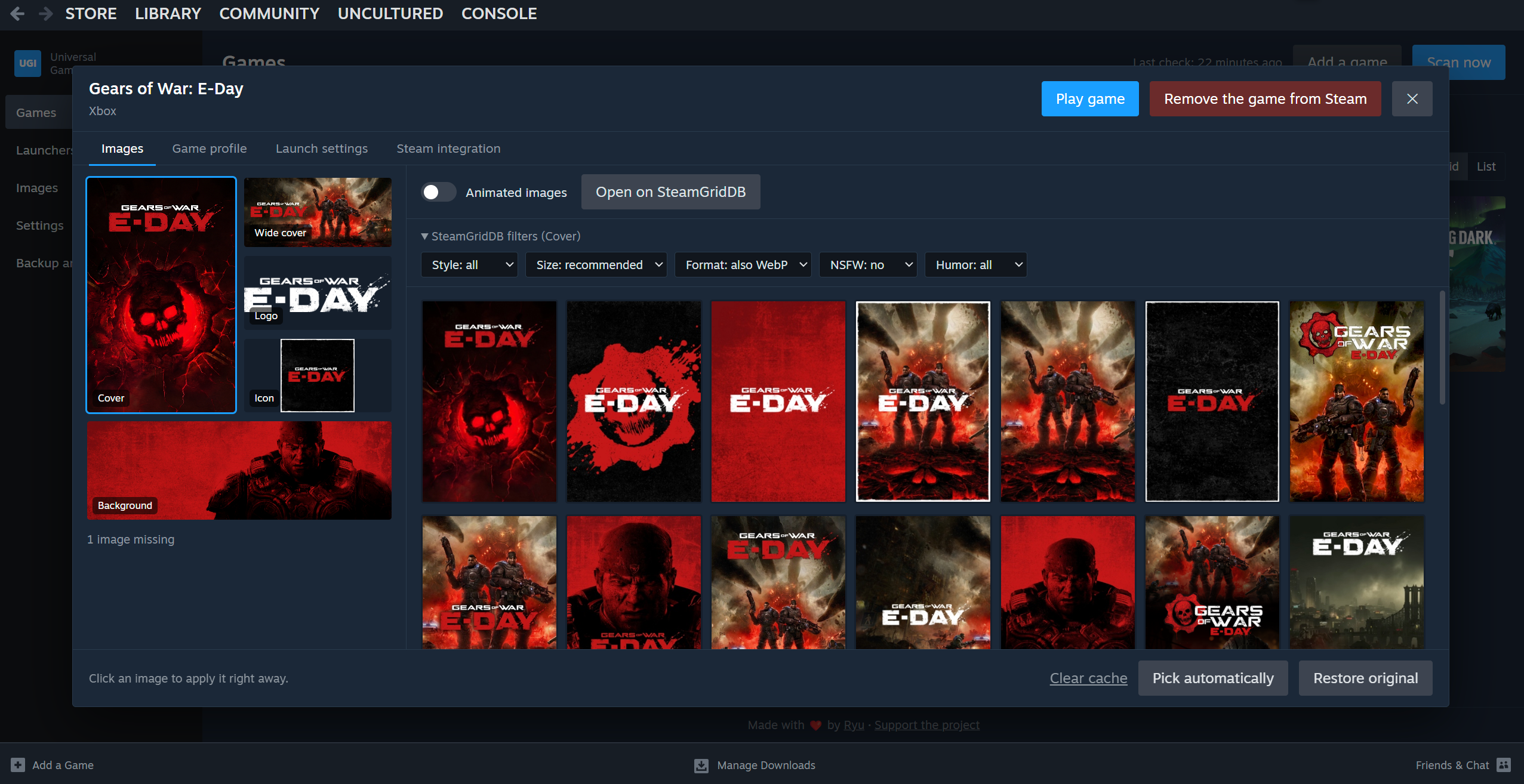
  • artwork from SteamGridDB (cover, wide cover, background, logo, icon), with a gallery to pick your own;
  • a store-style page in the library (trailers, screenshots, description, reviews, requirements), taken from the game's own store;
  • GOG, Epic and Xbox achievements on the game's page, with Steam notifications while playing;
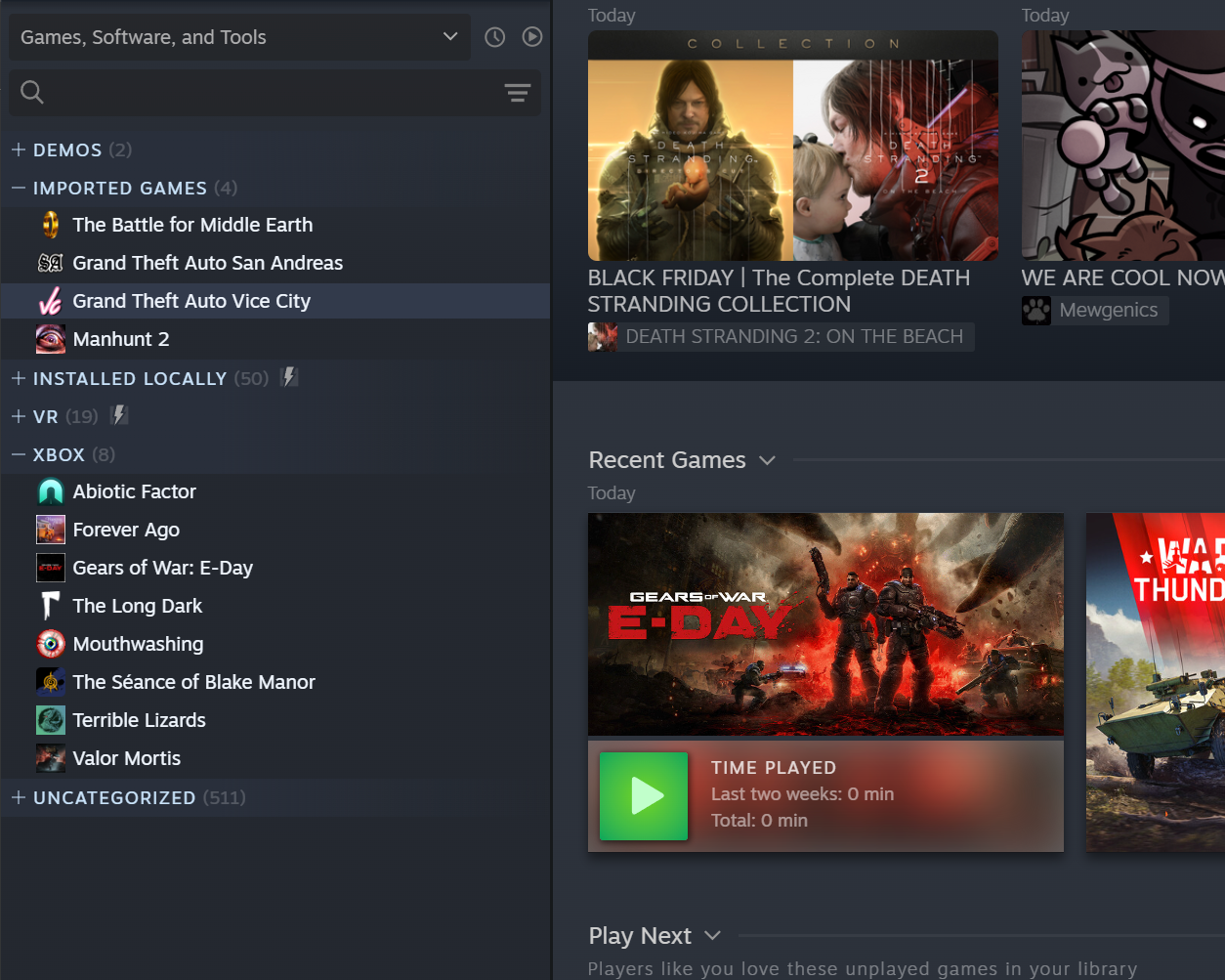
  • a collection and a Home shelf per launcher, if wanted;
  • launching through the launcher with playtime counted, and the launcher closed again afterwards.

It works in Big Picture with a controller and is translated into every language Steam offers.

Repository: https://github.com/GFocacetti/universal-game-importer

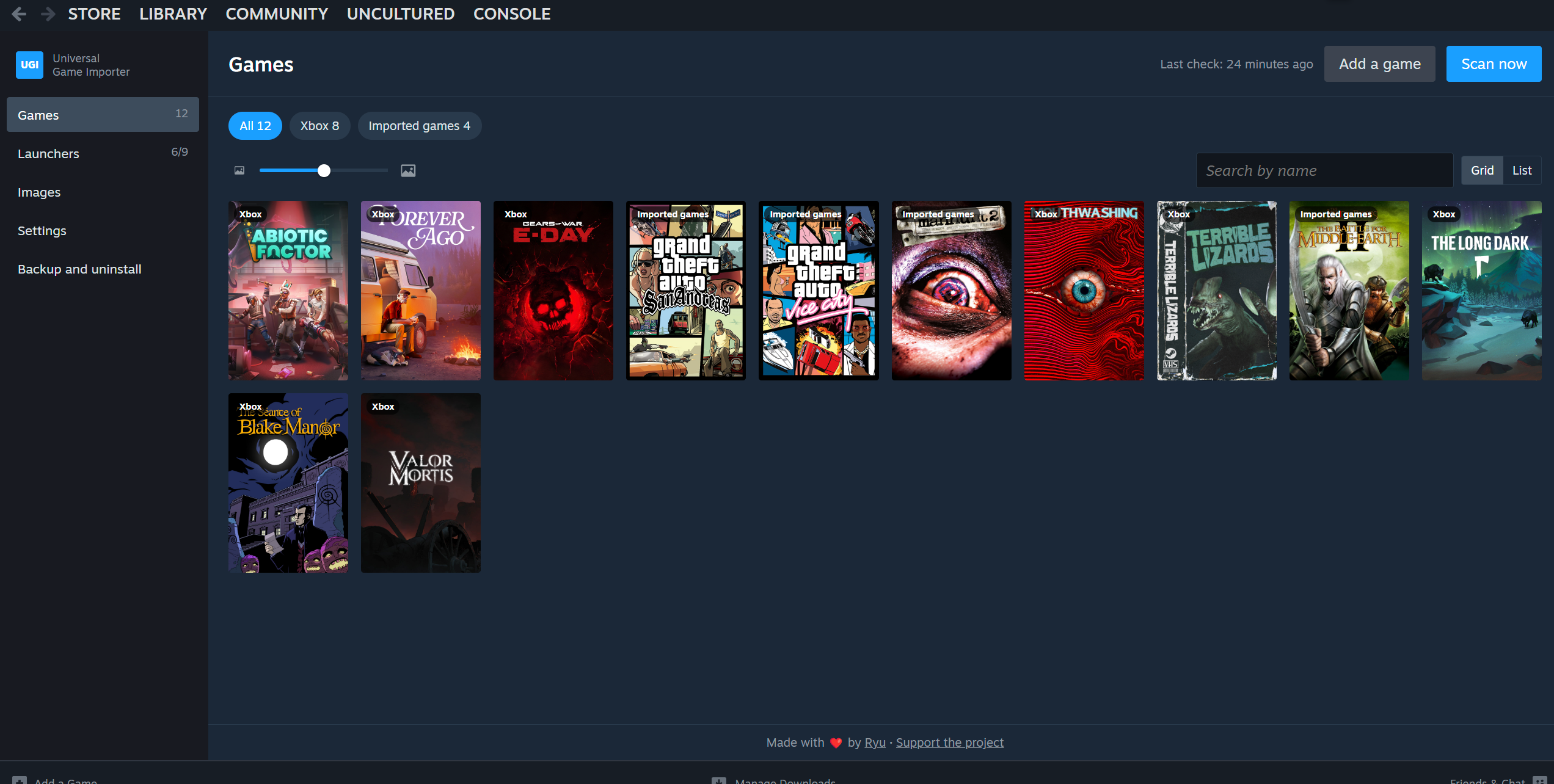
UGI page

A game page in the library

AI disclosure

To be fully transparent: UGI was developed with help from generative AI. I designed every feature, made the decisions on behaviour and UI, and tested each launcher and each change myself on real installs (including multiple friends' PCs), reporting the problems and verifying the fixes. I will maintain the plugin myself. I understand this may weigh against the submission and I'm happy to answer any question about how it works.

Notes for reviewers

  • Backend: the standard Millennium Lua backend. Where Lua can't do something it runs Windows PowerShell scripts (written to the plugin's data folder) to read the launchers' files and databases, and compiles two small C# helpers on the user's PC with PowerShell's Add-Type (reading SQLite databases through Windows' own winsqlite3.dll, and finding/focusing game windows). No prebuilt binaries are shipped.
  • UI: the game page parts and controller navigation use @steambrew/client components (Focusable, DialogButton, menus). UGI's own page, gallery and dialogs are plain HTML styled like Steam, because they are full windows Steam has no ready component for; I'm open to changing this if required.
  • External services: SteamGridDB (free, the user's own API key), the stores' public APIs (Steam, GOG, Epic, Microsoft Store), and optionally RAWG and OpenXBL (free keys) and the user's Epic account for achievements. None is paid and I don't profit from any of them.
  • Origin: it started from millennium-uwp-library-sync (MIT) and reuses ideas and code from Steam ROM Manager (GPL-3.0) and steam-easygrid (MIT); all are credited in THIRD_PARTY_NOTICES.md. UGI is GPL-3.0.
  • Platform: Windows only for now. Tested on both the Stable and Beta Steam clients.

Task Checklist

Developer

  • My plugin complies with the plugin submission guidelines (see the AI disclosure and UI note above)
  • I am the original author or an authorized maintainer of this plugin.
  • I have complied with all license requirements for the libraries used, including providing appropriate notices where necessary.
  • My plugin is fully open source and does not depend on any external paid services, except for widely trusted and well-known platforms. Additionally, neither I nor anyone associated with me profits from any such services.
  • Generative AI was used for most of the plugin's code.

Plugin Functionality

  • I have tested the plugin on both the Stable and Beta Steam update channels.
  • My plugin is unique, or provides additional or alternative functionality to plugins already on the store.

Backend Configuration

  • I use a standard Millennium Lua backend in my plugin.
  • I use custom binaries that or rely on other FOSS projects that aren't written directly using Millennium's Lua backend. (The PowerShell scripts and the two C# helpers compiled on the user's PC described above.)

Community Contribution


Testing Instructions

  • Verified by a third party on Steam Client Stable.
  • Verified by a third party on Steam Client Beta.

@UnculturedHack

Copy link
Copy Markdown

Plugin code pulled from the source repository and built locally. After testing on the stable client, I went to do more on the beta client and millennium wasn't loading/working (whether this plugin was installed or not) so I couldn't test there. However on the stable client it ran as described without any issue.

This is a very comprehensive plugin. It performs several functions and offers a ton of settings and customization options. I followed the instructions to create and add an API key for SteamGridDB (the instructions were clear and easy to follow). I then used the scan function to find all my locally installed non-steam games and it found every one - including those installed on a separate drive.
UGI

The game art looked great for all of them - I didn't notice any places where it didn't find the correct game art. I was able to launch the games it added without issue.
UGI_GoWE

I was also able to automatically make groups in my library for the imported games based on what launcher (XBOX, GOG, etc.) they were from. All of this worked as expected.
UGI_groups

I have two small suggestions:

  • When the main Library tab/page is open, consider adding a button somewhere for UGI. Getting to it from the Library dropdown works fine but a button for convenience would be good I think.
  • For step 1 of the SteamGridDB API key setup instructions: consider making the "steamgriddb.com" text a clickable hyperlink. I know you have the "Go to SteamGridDB" link after the last step but I think its more intuitive to do it this way so the user can more easily follow along with your steps without manually going to the site. Its a small thing but I think it improves the experience.

Nice work on this!

@UnculturedHack UnculturedHack mentioned this pull request Nov 20, 2026
8 of 13 tasks
@GFocacetti

Copy link
Copy Markdown
Author

Thanks a lot for taking the time to build and test UGI, and for the detailed feedback!

Both suggestions make a lot of sense. The clickable link is already in the works: the site address in the first step of the SteamGridDB guide (and the same for RAWG and OpenXBL) will open the page directly, and it will be in the next release. Here's how it will look:

UGI-guide-link-en

The Library button is a good idea too, but.. sure I'd like to find the right spot for it first, because I don't want to add visual clutter to the Library page but I'll look into it.

Thanks again!

Sign up for free to join this conversation on GitHub. Already have an account? Sign in to comment

Projects

None yet

Development

Successfully merging this pull request may close these issues.

2 participants