


Screenshots • Documentation • Install
A self-hosted web UI for Podman Quadlet, made for homelabs. Pods manages the applications, containers, pods, images, volumes, networks, secrets and journal of one or more Podman hosts, over SSH.
Note
Upgrades within Pods 1.x keep your data: pods-update migrates the database and keeps your setup, and Pods 1.x stays on version 1 of lpod's JSON contract. An install has one owner. Pods exports volumes but doesn't restore them yet. See Backups to restore an archive on the host.
- Your applications are plain Quadlet files. A
.container,.volumeor.networkfile is a systemd unit that Podman ships with. Pods installs them, starts them and shows what they're doing, but it never adds a format of its own on top. Delete Pods and every application keeps running, managed by systemd as before. You can always edit, install or debug them withpodman quadlet,systemctlandjournalctl. - systemd does the work. Starting at boot, restarting on failure, logs, timers, dependencies and
podman auto-updateall come from systemd and Podman. Pods adds no daemon or agent of its own on the host. lpod is a shell script that Pods runs over SSH. - Nothing has to keep running. Applications can sleep until a request comes in, through systemd socket activation (see On-demand applications). Pods itself does the same: it's a container that starts when you open it and stops when you leave.
- One UI for several hosts. Every host is an SSH target, the one Pods runs on too.
| What it is | How Pods differs | |
|---|---|---|
| Cockpit | A web console for a whole Linux server, with a Podman page for containers, pods and images | Pods is only about the applications on a host, and treats them as groups of Quadlet units: install from Git, routes, secrets, setup steps and updates. It runs fine next to Cockpit, and sleeps through a socket the same way cockpit.socket does. |
| lerd | A local PHP development environment on rootless Podman | lerd is for developing on your own machine. Pods runs applications on your servers and homelab. An application you develop with lerd can ship Quadlet files and a pods.yml to be installed with Pods. See Compared with lerd. |
| Laravel Sail | A Docker Compose development environment for one Laravel project | Sail is for development, with Docker and Compose. Pods is for running applications, with Podman and systemd, and isn't tied to Laravel. |
| Laravel Cloud | Managed hosting for Laravel applications | Laravel Cloud runs and scales your application for you. Pods runs any containerized application on hardware you own, and you're responsible for the host. |
| Portainer | A container UI for Docker, Swarm and Kubernetes, built around Compose stacks | Pods doesn't support Docker or Compose. Its applications are systemd units, so they behave like the rest of the host. |
Browser ──HTTP──▶ Pods (Laravel) ──SSH──▶ host ──▶ lpod … --json ──▶ podman, systemctl, journalctl
- Every host is an SSH target, the local one too. Pods runs in a container and reaches the machine it runs on through
host.containers.internal, so local and remote hosts use the same code path. - lpod is the host agent. Pods never runs
podmanorsystemctlitself. It only runslpod … --jsonand reads the JSON it returns. The CLI and the UI do the same thing, and you can always fall back tolpodin a terminal. - The JSON contract is versioned. Every payload carries
"contract": 1. Pods refuses a host that speaks a contract it doesn't know. The fixtures intests/Fixtures/lpod/contract-1/are the spec lpod implements. - Quadlets are the source of truth. An application is a group of Quadlet units (
.container,.pod,.kube,.volume,.network) as reported bypodman quadlet list. Pods stores no copy of your containers. It only stores the environments (hosts) and its own users. - One SSH key per Pods instance.
pods:installgenerates an ed25519 key pair. You add the public key to~/.ssh/authorized_keysof the user that owns the Quadlets. When you add a host, Pods pins its host key and refuses to connect when it changes. - Secrets only travel on stdin. Secret values are piped to lpod and never end up in command arguments, logs or the database.
- Reads are cached for a few seconds per host (
PODS_CACHE_TTL). Actions such as start, stop or prune clear the cache, and the pages poll for the new state. Other open pages of the host reload what changed right away, over Reverb (pods-reverb, on Pods' own address), so pages only poll for changes made outside Pods, such as CPU and memory: every 10 seconds by default (Settings, General, Refresh host pages: off, 3, 5, 10, 15 or 30 seconds, 1, 3 or 5 minutes), and every 5 seconds (or the shorter setting) while a unit starts or stops.
See docs/architecture.md for the details.
- Environments: add local and remote hosts, with host key pinning and a contract check
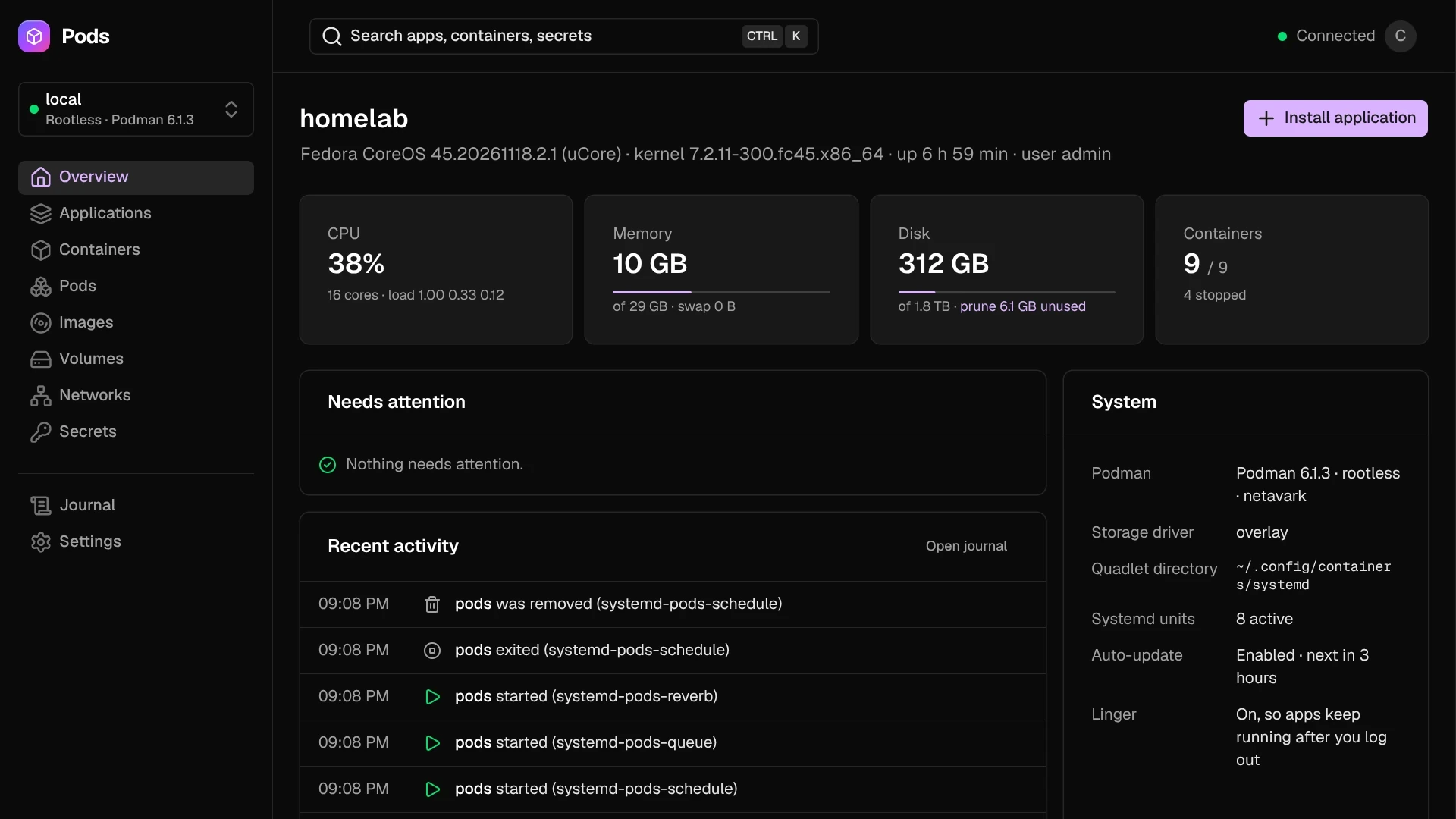
- Overview: host stats (CPU, memory, disk, containers), failed units, recent activity, and the applications you pinned, with Start, Stop and Restart
- Applications: list, start, stop, restart, redeploy and remove; containers, Quadlet files, logs and secrets per application; add, edit and remove drop-ins, with local ones (
*.local.conf) kept over updates; install from Quadlet files or a Git repository, with a check before installing, reading the repository'spods.ymlwhen it has one - Containers and pods: list, inspect, logs, stats, start/stop/restart and pruning stopped containers
- Images: pull, remove, prune and check for updates
- Volumes and networks: list, remove and prune, and export volumes as tar archives to download
- Secrets: create, update and delete, and add them to the applications that need them
- Journal: the host's journal, filtered by priority and time
- On demand: let an application sleep until its first request, through a systemd socket (see On-demand applications)
- Timers: start an application's jobs on a schedule with systemd timers, from its
pods.yml, and run them by hand - Proxy: an optional Caddy per host that gives applications hostnames and certificates (see Proxy)
- Settings per host:
podman auto-update(schedule and rollback), lingering, and updating lpod to the release Pods needs - Installable: add Pods to your phone or desktop as an app (PWA)
Pods targets Podman 6+ on systemd. Docker and Podman Compose aren't supported.
On each host:
- Podman 6 or newer, running under systemd. Quadlet is part of Podman, so there's nothing else to install for it. Most major distributions package Podman 6 in their current releases; check with
podman --version - lpod 4 in the user's
PATH(Pods also looks in~/.local/bin), withjqinstalled, andgitfor installing and updating applications from Git repositories and the catalog - An SSH server, and lingering for rootless users (
loginctl enable-linger) so their systemd user manager runs without a login
For Pods itself: PHP 8.5+, Node with pnpm, and ssh and ssh-keygen on the machine or in the container that runs it. Its units use RunInit=true, which needs Podman's catatonit (install.sh checks for it).
Pods runs on a host as rootless Podman Quadlets, for the user whose applications it manages. One command installs it:
curl -fsSL https://raw.githubusercontent.com/foxws/pods/v1.5.1/install.sh | bashIt checks Podman, systemd, lingering and SSH, installs lpod, installs Pods' units from containers/quadlets/production and its image from ghcr.io/foxws/pods, adds Pods' SSH key to your ~/.ssh/authorized_keys so the host shows up as the local environment, and prints a one-time setup code. Open Pods, which sends you to its setup page, and enter the code to create the owner (or pass --name, --email and PODS_OWNER_PASSWORD to create the owner from the terminal instead). Pods listens on 127.0.0.1:9393 (--port picks another; Cockpit has 9090): open it on the host, or through an SSH tunnel (ssh -L 9393:127.0.0.1:9393 HOST). To update it later, run pods-update, which keeps your setup.
See Installation for running Pods only while you use it, giving it a hostname, and preparing other hosts, then Getting Started for your first application.
| Guide | What it covers |
|---|---|
| Screenshots | What Pods looks like |
| Installation | Requirements, install.sh and its options, Pods on demand, a hostname for Pods |
| Getting Started | The owner, the catalog, and making your own repository installable |
| Compared with lerd | What each is for, and one PostgreSQL shared by several applications |
| Application Manifest | pods.yml: secrets, setup steps, routes, on-demand, timers and the catalog |
| Proxy | Hostnames and certificates for applications, with Caddy |
| On-demand Applications | Letting applications sleep until a request comes in |
| Backups | Volume sizes, exporting volumes and restoring them by hand |
| Health Checks | Checking that Pods itself is up |
| Development | Working on Pods: setup, running it under Podman, commands and tests |
| Architecture | How Pods talks to hosts through lpod and SSH |
composer setup     # install, .env, key, migrate and seed the roles, pnpm install and build
php artisan users:create --super-admin
composer dev
See Development for connecting the local host, running Pods under Podman, the commands and the tests.
Volume restores, invited users with roles per environment, streaming logs, and more of the application catalog. See docs/roadmap.md.
The MIT License (MIT). See LICENSE for more information.