


Enhanced version of todowrite so coding agents can signal long-running work
without looking dead, plus a zero-token-burn out-of-band relay so the agent
never has to poll stdout just to keep the UI alive. Token cost scales with
milestones, not with task duration.
Three MCP tools back this: progress (write), progress_touch (refresh an
entry's timestamp/detail without changing its status or progress), and list
(read-only companion: your session's trees as text, with dismissed entries
hidden). The tree is the
glance-able layer above the transcript — thought traces and command output are
a wall of text; the rollup is the live view of what is happening, what is
blocked, and what is next.
Implements the Agent Progress Tool proposal for OpenCode 2, and is written as a portable reference implementation any harness can copy or adapt.
Versions: MCP server 2.12.0 · OpenCode plugin 2.28.0
Advanced docs: schema, relay internals, state store, architecture, all options, file map →
- Plugin —
@jakedowns/progress-tool-opencode-plugin - MCP server + relay —
@jakedowns/progress-tool-mcp
opencode plugin add @jakedowns/progress-tool-opencode-plugin@latest@latest makes OpenCode check for and install new versions automatically
(startup and every 24h). Use @^2.18 instead for automatic updates capped to
major 2; a bare package name stays on the installed version until you run
opencode plugin update.
The plugin depends on the MCP package and registers progress-server for
you (autoRegisterMcp: false to opt out), so that one command is the whole
install. It spawns the server with a detected node/bun runtime — never
process.execPath, which is the opencode binary under Desktop. Pin one with
{ "options": { "mcpRuntime": "/absolute/path/to/node" } } if needed.
Restart the service or reload the window. The pill appears above the composer,
and progress, list, progress-relay, and progress-emit become available.
If the MCP server fails to start, the plugin withholds its injected progress rules and strict-mode nudges until the
progresstool actually appears in the model's tool set, so agents are never told to call a missing tool.
Manual configuration, if you prefer:
No AGENTS.md edits required. The plugin injects the progress and relay
rules into every session's system instructions, and the progress tool response
reinforces them at the moment work starts. Disable with
{ "options": { "injectInstructions": false } }.
Skills: progress-tool and delegation register automatically. The two demo
skills ship in optional-skills/ and stay off unless you set
{ "options": { "demoSkills": true } }. Disable the default pair with
{ "options": { "registerSkills": false } }.
Want a demo now? Ask the agent to "demo OSC 9;4 support" or "demo the task
tree", or run bash demo/tree-demo.sh (PROGRESS_TREE_DEMO_FAIL=1 shows the
error roll-up).
Agents call progress at milestones:
progress({
id: "build-1",
status: "running",
title: "Running npm build",
detail: "Starting",
progress: 0
})The response includes the exact relay command. Wrap the long command once and the OS streams the output — no model polling:
progress-relay --id build-1 --title "Running npm build" -- npm run buildExit 0 marks it done; non-zero marks it error with the code in detail.
Nesting a task is just parentId:
progress({ id: "link-lib", status: "running", title: "Linking libSDL2.a", parentId: "build-1" })Multi-line titles and details accept real newlines, \n / \r\n, or <br>.
Custom nudges are opt-in: add customNudges: true to the plugin's options.
They let a user or agent define the text, trigger, cooldown, criteria,
lifetime, and delivery of an additional model-facing reminder.
/progress nudge # wizard (session, project, or global scope)
/progress nudge list
/progress nudge on project:stale-build
Palette: Progress: custom nudge… and Progress: custom nudge status.
Rules can also be edited directly in ~/.config/opencode/progress-nudge.json
or <project>/.opencode/progress-nudge.json.
- Text supports
{id},{title},{status},{age},{count},{action}. - Triggers: interval, model steps, either, or event-only.
- Criteria: status, stale age, no-progress time/steps, in-flight, tree empty/non-empty, idle-only, entry ids, and session scope.
- Delivery: replace built-ins, alongside them, or a synthetic
blockmessage. - TTL and a fire cap (one-shot) keep temporary rules temporary.
Agent tool progress_nudge is session-scoped only; project/global rules
require the user-facing slash command, palette, or config file. Agents can
always quiet non-block reminders for the session with
progress_nudge({ action: "mute", minutes: 30 }), even when the rule editor is
disabled. See
README-advanced.md for the full schema,
files, presets, and semantics.
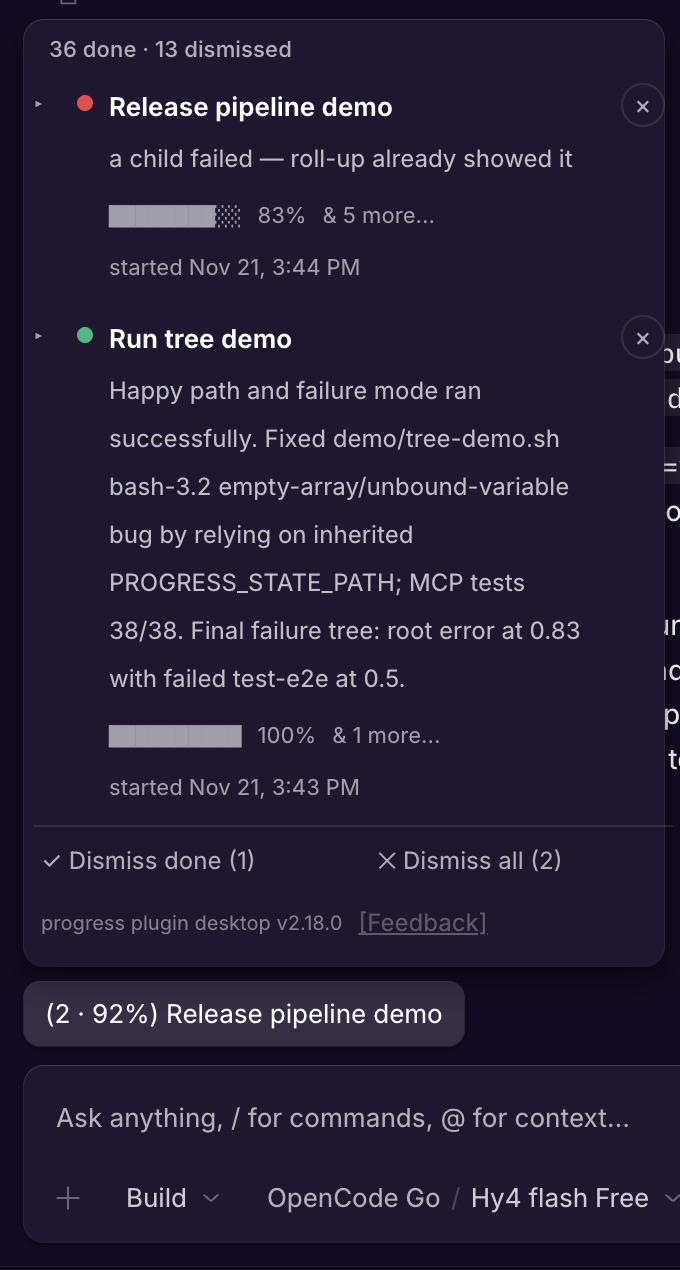
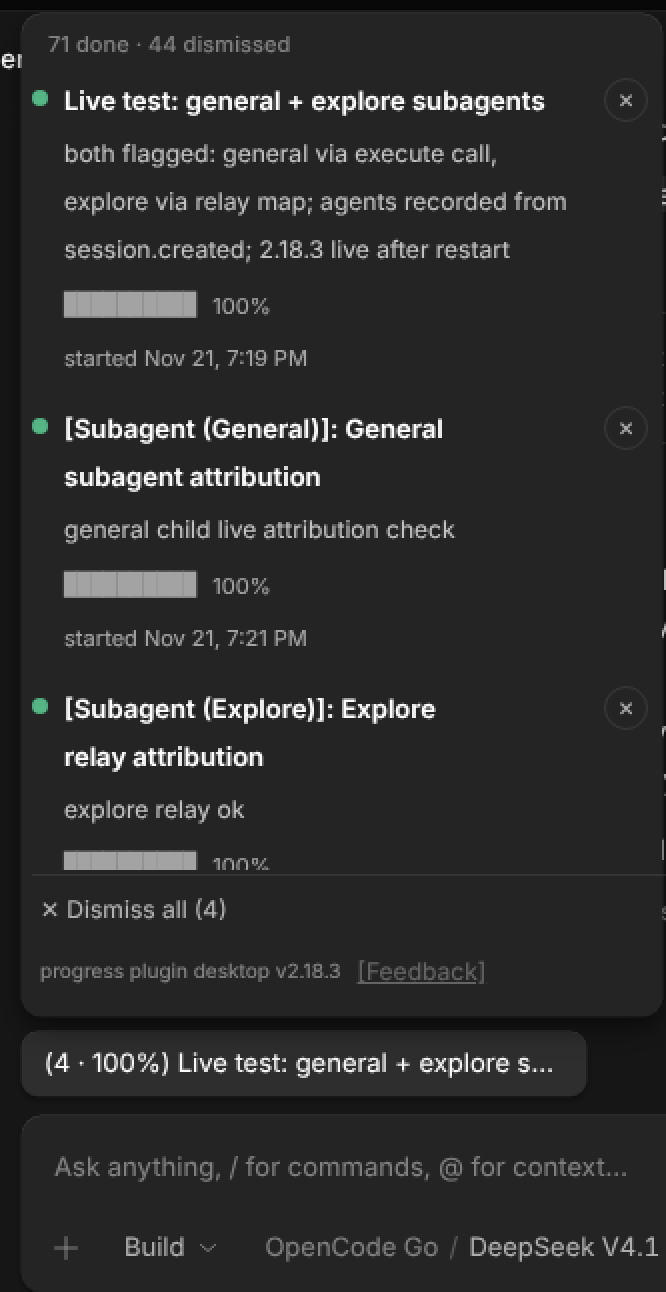
- Desktop/web pill: one row per root, with
(N · agg%)when several roots exist, hover details, and a menu with the full tree. The footer links the plugin version to the repo's Releases page, and [Settings] opens a read-only panel of the effective view, reminder, and data options. SetguiLayout: "sidebar"to move the tree into a pinned tab in the session's side panel (guiSidebarWidthsets its initial width), or use the pill's[Sidebar]action / the "Progress: swap layout" command at runtime.guiDetailLinescaps detail text in both the pill menu and sidebar (default1line with…;0hides details;-1shows full text).treeTheme: "compact"renders tree rows (pill popover and sidebar) without progress-bar glyphs or the started line, with a single clamped detail line and a40% · & N moremeta suffix.treeTheme: "ultra-compact"goes further: one title line only, with a status-light emoji, a small5m agoprefix (hover it for start→end and total duration), and the dismiss button. The title is regular weight at 12px. There is no progress bar, percentage,startedrow, detail, or& N more; rows use 3px total spacing and the tree has a 5px outer margin. The composer pill capsule itself keeps itsbarStylerendering. Use the Progress: switch tree theme palette command to pick ASCII, Emoji, Compact, or Ultra; each option shows a live preview. The choice applies immediately and is saved astreeThemeplusbarStylein the OpenCode config that declares the plugin. Expanded child rows use the same└─branch prefix as the TUI, placed before the status dot. - Nudges panel (desktop): the sidebar's New tab page lists Nudges next
to Progress. It opens a live tab with the active engine (
sharedby default,legacywhen opted in), the standing reminder text, mute state with a 30-minute mute/unmute action for the shared engine, and the newest nudge events for the routed session — fires, gate rejections, clears, touches, and legacy suppressions. Each row is tagged[in](an agent wrote progress or used the nudge tool) or[out](a reminder aimed at the agent); child-session traffic also carries a[sub]tag with the subagent's name. State chips above the log show the live gate:[muted • 3m remaining],[nudged • 2m ago],[grace say • 7m left],[grace progress.tree • 7m left],[gap • 40s left],[capped • 2/2], or[listening]. Grace is split per gated producer, and its hover shows how many attempts that producer had skipped in the current window. Transition rows are hidden by default (Show transitions) and consecutive runs collapse topending → done ×3; each row also shows[tree]or[hidden dismissed/cleared]against the current view. A health line sums fires by producer, rejection reasons, and median nudge-to-progress latency; a usage table below it shows applied nudges → agent usage per tool (say notes, progress updates), with skipped attempts by reason on hover. Test nudge fires custom text through the real gate (context only), Clear log truncates the JSONL, and Purge resets this session's mute, standing reminder, gap clock, and fire count without touching the log. A dot on the tab marks new warn/block events while the tab is not selected. The tab polls every 5 seconds and stays available in either layout mode. - TUI: compact tree above the composer, roots collapsed, capped at
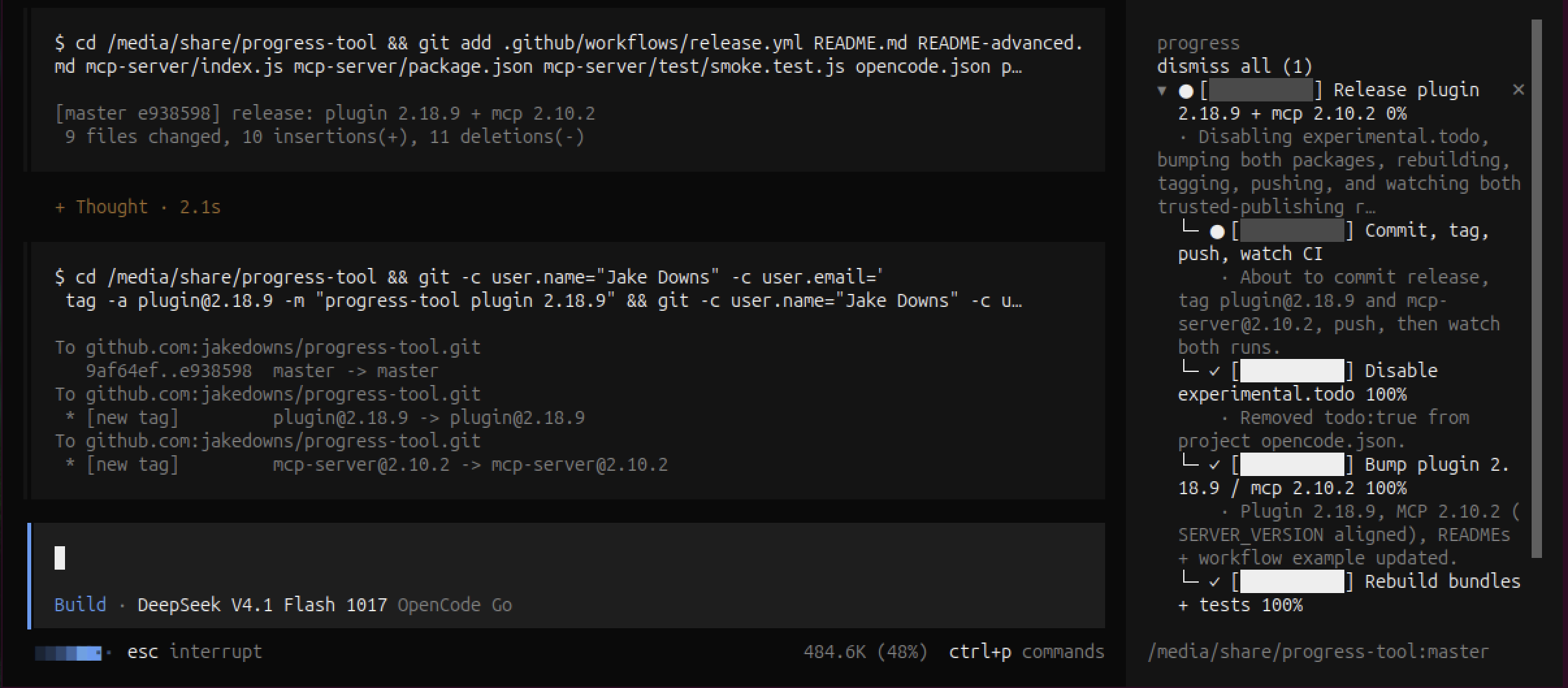
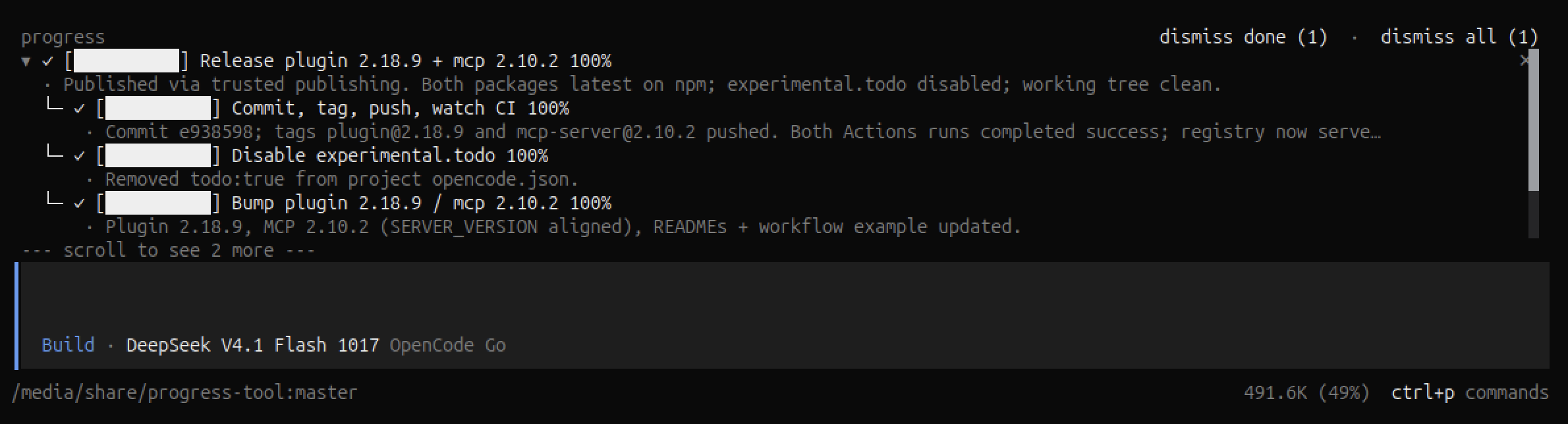
tuiMaxRoots(default 3) and scrollable insidetuiMaxRows(default 8) so long lists never push the prompt away. A--- scroll to see N more ---hint appears on overflow;/progressopens a dialog to expand a tree or dismiss tasks, and the palette can change the root cap or switch the tree theme. Click the[-]marker in the header to collapse to a one-line[+] progress: …summary (click it again to expand); the palette command does the same. WithtreeTheme: "compact", TUI rows drop the progress bar and showtitle 40% · & N moreinstead. WithtreeTheme: "ultra-compact", rows match the desktop ultra theme: one line per task with a status light and a short age prefix (5m ago), no bar, percentage, or detail row. SettuiLayout: "sidebar"to park the tree in the sidebar instead, or run/progress swap-layoutto flip placements at runtime. - Running and waiting tasks stay visible; errors stay until dismissed or
updated; completed tasks stay unless dismissed (or
autoHideDoneis on). - Dismissal works at any depth: every nested row has its own
✕; dismissing a child hides its subtree and re-rolls the parent from the remaining children. A dismissed tree stays hidden through relay ticks and sibling activity. An agent update clears the dismissal on that entry and its ancestors — except a terminal dismissal (dismissed while done/error), which later done/error re-reports do not revive; a lifecycle restart or a child failure does. A relay lifecycle restart (a terminal entry returning to running) also revives the entry and its ancestors, and any descendant update revives an ancestor that was soft-cleared with Progress: clear list. - Clear/delete are palette commands (not pill buttons): Progress: clear
list soft-deletes finished/dismissed entries while keeping records on disk,
hard clear this session removes one session's store copy, and hard clear
entire progress store requires typing
DELETE. Deleting a chat purges its store entries unlessretainDeletedSessionProgressis enabled; the mirrored Markdown tasklist is never removed. - Narration (
say, opt-in): setsay: trueto give the agent a mid-turn note tool.sayModeschooses the surfaces (default["tree"];sayModeis a scalar alias):treeshows a dim latest-note line above the tree (TUI; GUI sidebar panel and pill popover),pillshows the notes composer pill, andtoastraises one toast per new note (warning tone forblocked/question, with[Subagent (X)]attribution). The TUI has no pills, sopillmaps to its tree line; the GUI composer layout has no tree, sotreefalls back to the pill. An empty array records notes without showing them. Click the TUI line or open/progress→ Notes / the pill popover for newest-first history; dismiss one note with its×or all notes at once. In the desktop sidebar, click the notes line to expand the full undismissed list inline; each row has its own×and a dismiss-all button. Dismissals delete the note from the shared ring buffer, so every client updates. Notes also auto-hide from every surface aftersayAutoHideTimeoutMs(default 60s;0keeps them until dismissed). An opt-insayNudgereminds a silent agent after a long tool ("long-tool") or after a run of tool calls with no note ("silent-run"); it only exists whensay: true. Recommended note length: 20–80 characters for terse intent/status pings; setsayMinChars: 20andsayMaxChars: 80. The shipped defaults stay180/260for longer intent-plus-ETA notes. Notes survive clear-list, roll child sessions up to the parent, and are purged with the session or a hard clear. A note never ends the turn. - Subagents: child sessions are mapped to their parent automatically
(
session.created→~/.opencode-progress-sessions.json), and the parent id is stamped into subagent prompts as a fallback. Roots created by a child render as[subagent <session name>]: Title(name truncated to 20 chars); hover the row to see the subagent type. - Entries are retained by default so the store doubles as a report. Opt into
pruning with
PROGRESS_AUTO_PRUNE_S(andPROGRESS_STALE_MSfor orphans).
| Option | Meaning |
|---|---|
scope |
"session" (default) or "all" |
tuiMaxRows |
TUI tree row cap (default 8, max 50) |
tuiMaxRoots |
TUI root cap before the full-tree summary (default 3, max 50) |
tuiLayout |
TUI placement: "composer" (default) or "sidebar" |
tuiSidebarRows |
Sidebar viewport height in rows (default 0 = full tree, sidebar scrolls; max 100) |
guiLayout |
Desktop/web placement: "composer" pill (default) or pinned "sidebar" panel |
guiSidebarWidth |
Desktop sidebar initial width in CSS pixels (default 360, clamp 240-800) |
guiDetailLines |
Detail line cap in pill menu and sidebar: -1 full, 0 hidden, n lines (default 1) |
treeTheme |
Tree row theme: "ultra-compact" (default; title + status-light emoji + age + dismiss), "compact" (no bars/started line, one detail line), or "default" (bars). The Progress: switch tree theme preset picker writes this and barStyle back to the config |
indicatorStyle |
Status indicator: "dot" (default), "circles", or "checkbox". The Progress: indicator style command saves it globally (project config fallback) |
customNudges |
Enable custom nudge rules, the progress_nudge tool, and their TUI/palette commands (default false) |
taskListFile |
Mirror tasks to a local Markdown checklist (default off) |
taskListLocation |
1 = project root (default), 0 = .progress/, 2 = ~/.opencode-progress/ |
taskListView |
"ui" (hide dismissed + rolled-up status) or "raw" |
taskListDetail |
"code" (safe fenced block), "escaped", or "raw" |
taskListOrder |
"newest-first" (default) or "oldest-first" |
relayMirrorLevel |
0 off (default), 1 all relay entries, 2 relay errors only |
expandRootsByDefault |
Expand trees by default (default collapsed) |
strictMode |
"nudge" / "force" / "off" silent-work nudges |
staleEscalateAfter |
Entry reminders before one synthetic escalation (default 3; 0 disables) |
idleReminder |
Turn-end nudge when tasks remain (default on) |
nudgeEngine |
"shared" (default) or "legacy"; opt back to legacy if shared delivery degrades after an update |
demoSkills |
Register the demo skills (default off) |
barStyle |
"blocks" (ASCII) or "emoji"; the Progress: switch tree theme presets set this with treeTheme |
refreshMs |
View refresh interval (default 1000) |
say |
Enable the opt-in narration tool and notes lane (default off) |
sayModes |
Note surfaces: string or array of "pill", "toast", "tree" (default ["tree"]; sayMode is a scalar alias; [] records without showing) |
sayAutoHideTimeoutMs |
Hide notes older than this from every surface (default 60000, clamp 0..86400000; 0 keeps until dismissed; view-only) |
sayToastScope |
Toast "own" notes (default), own + child "warnings", or "all"; child notes still roll up in the tree/pill |
sayNudge |
Opt-in reminder, only with say: true: "long-tool"/true, "silent-run" (forgot-to-narrate call count), or "both" (default off; context-only, never synthetic) |
sayNudgeMinCalls |
Tool calls with no note before a "silent-run" reminder (default 3, clamp 1..50) |
sayNudgeEscalateAfter |
Ignored say nudges before one synthetic block (default 3; 0 disables) |
retainDeletedSessionProgress |
Keep store entries when a session is deleted (default off) |
The optional task-list mirror is always written as tasklist-<session>.md. Add tasklist-*.md (and .progress/ if you use location 0) to your .gitignore — it contains plaintext task titles and details. When enabled, the palette command Progress: task-list mirror view switches between the UI view and the raw store view.
cd plugin
npm install
npm run build # compiles dist/gui-experimental.cjs + dist/tui.js
cd ../mcp-server && npm link # optional: progress-relay / progress-emit on PATHRegister the checkout (desktop/browsers read the global config):
{
"plugins": [{ "package": "/absolute/path/to/progress-tool/plugin" }]
}No separate cli.json entry is needed in V2: the TUI part loads with the
server plugin. opencode plugin add only accepts npm/Git specifiers, so a local
checkout must be registered via config. Build details and the precompiled-TUI
rationale live in the advanced guide.
Reload the window or restart the service. The plugin server log shows
loading plugin … entrypoint=…/src/index.ts, and the pill appears above the
composer. (opencode plugin list only lists registry-installed packages, not
local checkouts.)
Standalone GUI: ./launch-gui.sh, then open http://localhost:8765.
Web tabs (experimental host support)
On builds with web GUI plugin support, the pill loads in a browser tab when enabled in the config that applies to that directory:
{ "experimental": { "plugin_gui_web": ["opencode-progress"] } }The value is the plugin id, not the package name. Only setup runs on the web
(no main, no Ipc). Upstream tracking:
anomalyco/opencode#60976.
opencode mcp remove progress-serverRemove the plugin entry from ~/.config/opencode/opencode.json. V2 needs no
cli.json entry; remove the old one if an earlier version added it. For a
published package,
opencode plugin remove <package> also works. If you linked the relay:
cd mcp-server && npm unlink -g progress-mcp-server.
- Advanced guide — schema, relay flags, state store, architecture, testing, file map.
- Relay specification — harness-agnostic contract.
- Desktop status shim — append progress beside the native status text.
- TUI/CLI guide — text-mode progress bars.
- Plugin README — skills, options, and packaging.
License: MIT.
{
  "plugins": ["@jakedowns/progress-tool-opencode-plugin@latest"],
  "mcp": {
    "servers": {
      "progress-server": {
        "type": "local",
        "command": ["npx", "-y", "@jakedowns/progress-tool-mcp"]
      }
    }
  }
}