
Turn short display text into procedural embroidery on Canvas 2D, with stitch flow derived from the loaded font’s rasterised glyphs.


Homepage: threadtext.com (live, interactive demo) · npm: @overpunch/threadtext
Framework-agnostic core (createThreadText), a React hook + component (useThreadText / <ThreadText>), and Framer / Webflow ports. Zero required dependencies; react/react-dom are optional peers.
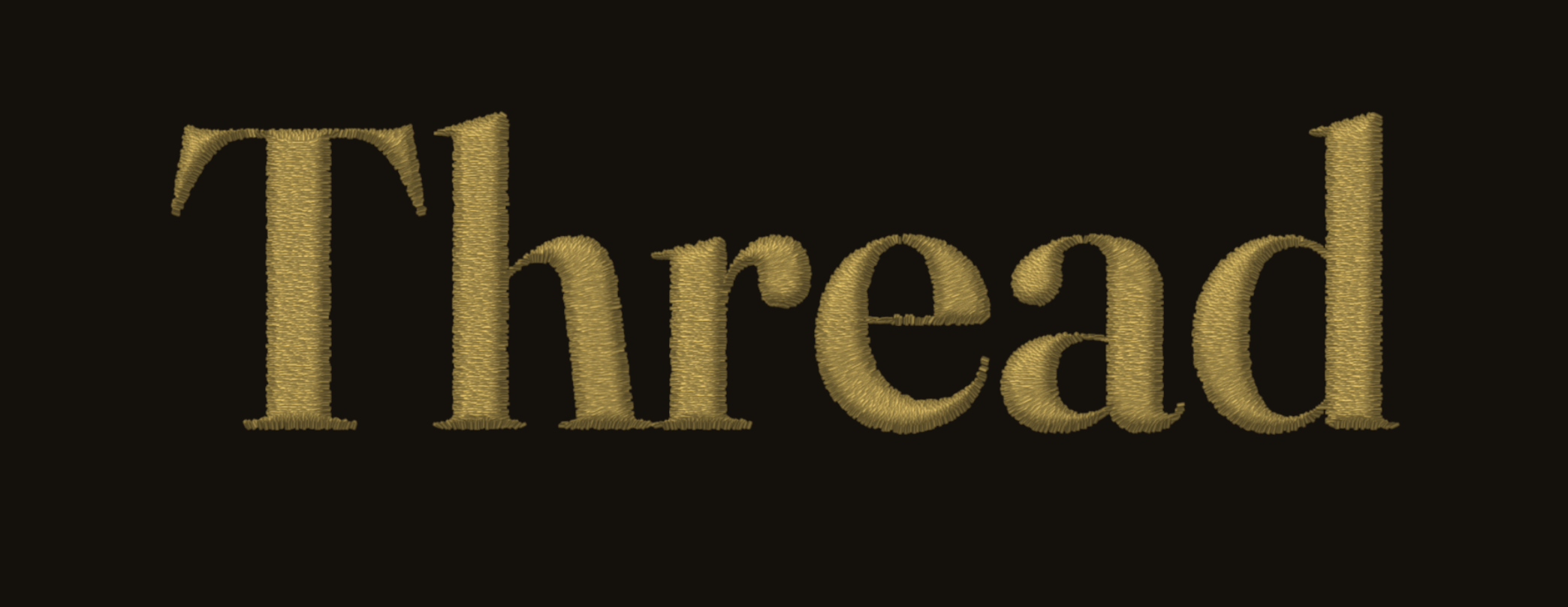
See it move. It sews itself in stitch-by-stitch and reacts to the cursor, so a still can't fully show it — the live demo at threadtext.com is the fastest way to judge it.
Give it a word set in any loaded (variable) font and it renders it as raised satin floss on a transparent ground — satin threads that run across each stroke and fan around the curves, with shading that suggests raised floss and an optional sew-in animation. The transparent canvases can sit over your page background. The renderer builds the effect from rasterised glyph masks and pre-shaded thread sprites.
It's built for single words / short display type — a hero word, a logotype, a stitched headline — not body copy.
Each step below is what actually produces the thread look — the plain-language idea first, the precise technique in parentheses:
- Draw the glyphs to an offscreen canvas from the loaded font (rasterise; extra variable-font axes applied only where the 2D context exposes
fontVariationSettings). - Measure how deep inside each stroke every pixel is (an exact Euclidean interior distance transform).
- Work out which way the thread should run — always across the stroke, fanning smoothly around curves (a flow field, smoothed in double-angle orientation space so the two opposite edges of a stroke agree instead of cancelling).
- Lay the stitches by stamping many small, pre-lit thread images along that flow (a reused set of pre-shaded thread sprites — ~20 brightness variants placed as thousands of individual stitches).
- Shade the stitches to suggest depth (a dome-shade / normal map over the transparent ground).
- Sew it in one cross-row at a time as an animation, and add a subtle cursor-driven sheen as you move over it.
The distance, flow and shade calculation can run in a Web Worker once its handshake succeeds. Glyph rasterisation, sprite construction and painting remain on the main thread; first paint and unavailable, blocked or timed-out Workers use synchronous geometry (see Requirements).

The sew-in animation (satin, machine style).
import { createThreadText } from '@overpunch/threadtext'

// Declare the face (any @font-face / next/font / CSS Font Loading API) — the core
// waits for it to load before drawing, so you don't have to await it yourself.
const host = document.getElementById('host')
if (host) {
  const thread = createThreadText(host, {
    text: 'Thread',
    font: '"Your Font", Georgia, serif',   // glyph geometry drives the stitch flow
    weight: 680,
  })

  thread.setText('Threads')                            // re-fit to width and redraw without a sew-in
  thread.update({ threadColor: '#e6c200', fill: 0.8 }) // live changes — instant, no re-sew
  thread.replay()                                      // re-run the sew-in animation
  thread.resize()                                      // re-fit to the container
  thread.destroy()                                     // cancel rAF, remove listeners, free canvases
}
The host element needs a resolved width — the word is fitted to host.getBoundingClientRect().width, and re-fitted whenever that width changes (window resize or the container alone). A font that finishes loading late is picked up and redrawn. createThreadText is SSR-safe: called without a DOM it returns an inert no-op handle, so it won't crash a server render.
Without React: import from @overpunch/threadtext/core — the same renderer with no React import at all.
The embroidery is drawn on canvases, which are marked aria-hidden. The renderer keeps matching existing content in a visually hidden span and leaves the host role unchanged, so <h1> stays a heading. For an empty host or different supplied text, it adds a hidden text copy; mismatched original content is hidden until teardown. Validate assistive technology, find-in-page and translation in your target browsers. Keep interactive links outside the embroidered host so they remain visible and discoverable. destroy() puts the element's own content back (the same nodes, listeners and all) and removes the inline styles it set. In editable mode a real text input carries the value instead.
Invalid numbers (NaN, Infinity, negative pitch or rate) fall back to the defaults, an unusable font falls back to Georgia, serif with a console warning, and empty text reserves no space.
import { ThreadText } from '@overpunch/threadtext'

<ThreadText text="Thread" font='"Your Font", serif' weight={680} />
Next.js / App Router: the React entry uses useRef/useLayoutEffect, so it's a Client Component — put 'use client' at the top of the file that imports <ThreadText> (or your own wrapper). Use @overpunch/threadtext/core for the framework-agnostic import. The React component renders an empty host before its client effect adds text and canvases; it does not supply server-rendered fallback text.
Use as for the element type (<ThreadText as="h1" text="Thread" /> stays a heading). HTML attributes and handlers (id, aria-*, data-*, lang, onClick…) are passed through to the element.
For a custom container or your own imperative control, use the hook — it creates the instance, applies every option change live, and calls destroy() on unmount:
import { useThreadText } from '@overpunch/threadtext'

function Stitched() {
  const ref = useThreadText<HTMLDivElement>({ text: 'Thread', weight: 680, threadColor: '#e6c200' })
  return <div ref={ref} style={{ width: '100%' }} />
}
Framer — add src/framer/ThreadText.tsx as a code component (Insert → Code → New Component, or host it and add by URL). It imports the core straight from esm.sh, so there's no build step, and provides property controls for text, font, weight, colour, alignment, stitch/sew style, optical size, rate, sheen and animation. The wrapper imports the pinned 0.5.0 package from esm.sh; it does not expose every core option.
Webflow — drop the self-contained embed bundle (no React, no module loader) into an Embed element and mark any element with data-threadtext:
<script src="https://unpkg.com/@overpunch/threadtext/dist/threadtext.webflow.min.js"></script>

<div data-threadtext
     data-tt-text="Thread"
     data-tt-font='"Your Font", serif'
     data-tt-weight="680"
     data-tt-thread-color="#e6c200"
     data-tt-stitch-mode="satin"
     data-tt-sew-style="machine"></div>
The bundle auto-initialises every [data-threadtext] element — including ones added to the page later (CMS lists, tabs) — and frees the renderer of any that are removed. It exposes window.ThreadText: init(root?) sets up new elements under (and including) root, leaving running ones alone; restart(el) rebuilds one after you change its attributes; destroy(el) restores it. Supported attributes: data-tt-text, data-tt-font, data-tt-weight, data-tt-thread-color, data-tt-thread-color2, data-tt-color-mode, data-tt-backstitch, data-tt-outline-color, data-tt-fill, data-tt-align, data-tt-pitch, data-tt-stitch-mode, data-tt-sew-style, data-tt-sew-rate, data-tt-sheen, data-tt-animate, data-tt-editable, data-tt-axes (JSON).
All fields on ThreadTextOptions. Rendering cost depends on the word, font, pitch and surface size; live updates are not a frame-rate guarantee. Most can be changed live with instance.update(...) — colour, font, weight, size (fill), pitch, stitch mode, sew style/rate, sheen, axes and editability all redraw instantly without re-running the sew-in. Two exceptions: text changes go through instance.setText(...), and reducedMotion is fixed at construction (changing it recreates the instance).
text— the word to embroider.font— CSSfont-familyof an already-loaded font; its glyph geometry drives the stitch flow.weight— numeric font weight (drives thewghtaxis via the standard font shorthand).axes— variable-font axes, e.g.{ opsz: 40, SOFT: 60 }, applied via canvasfontVariationSettingsonly when that property exists on the 2D context; ignored where unsupported.threadColor— floss colour.colorMode—'solid'(default) ·'twotone'(two colours as alternating threads packed side by side) ·'gradient'(a smooth colour transition across the word).'twotone'/'gradient'usethreadColor2as the second colour.backstitch— add a darker running-stitch outline traced around each glyph (sews in last);outlineColorsets its colour (defaults to a darkenedthreadColor).fill— size: the fraction of the container width the word spans (it re-fits on load/resize).align— horizontal placement of the word in the canvas whenfillleaves spare width:'center'(default) ·'left'·'right'.pitch— thread spacing (how tightly the stitches are packed across each stroke).stitchMode—'satin'·'cross'·'chain'·'running'textures (below).sewStyle—'machine'(satin rows in parallel) or'hand'(one letter at a time, widest threads near the top first, thin edges last).sewRate·animate— sew-in speed and whether it plays.reducedMotion— force-skip the sew-in animation and draw the finished piece in one frame (also honoured automatically when the OSprefers-reduced-motionis set).sheen— cursor-following highlight.editable+onTextChange— make the surface typeable (backed by a real<input>, so touch keyboards and IME work). Callinstance.focus()to focus it programmatically.
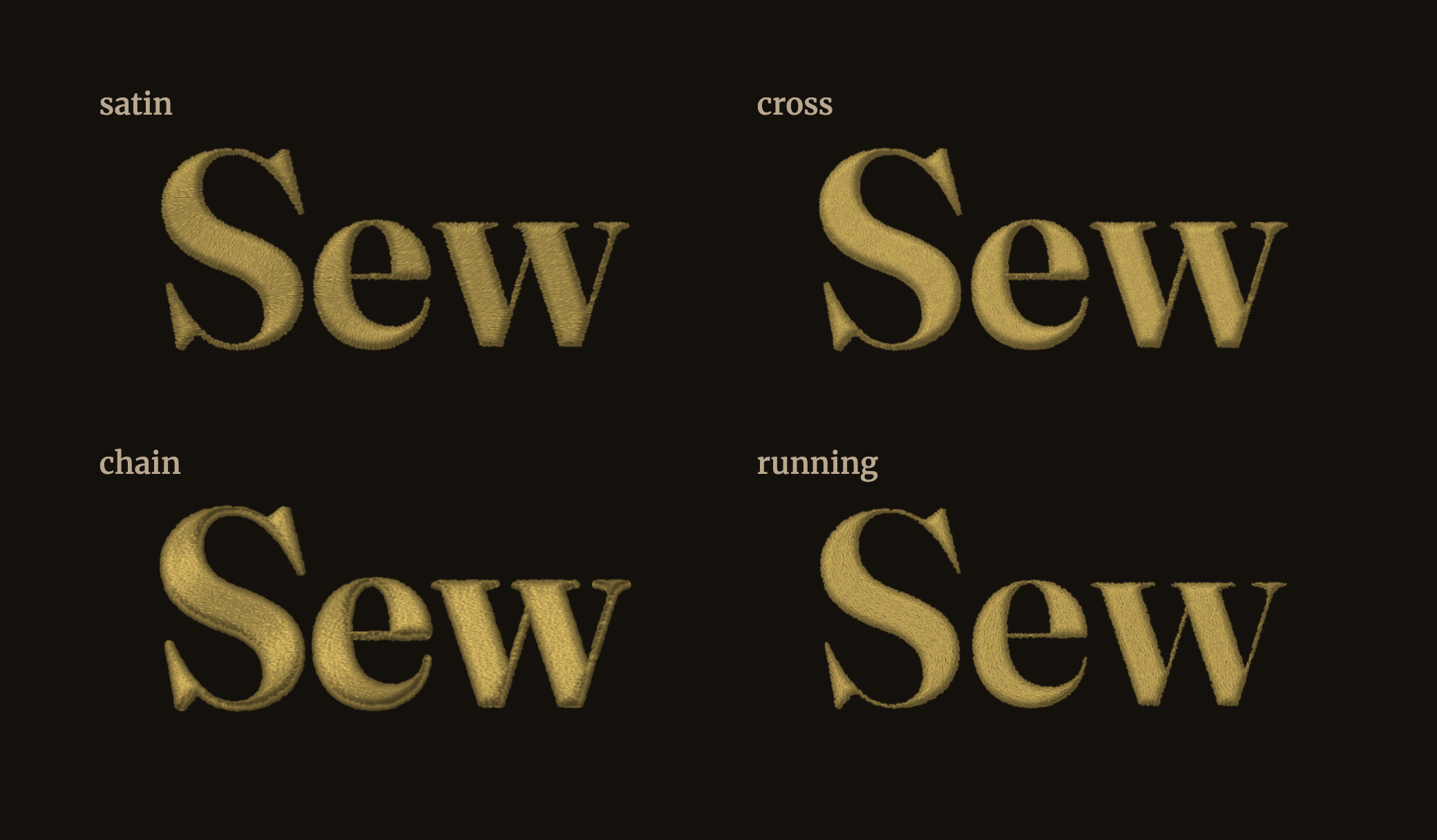
The four stitchMode textures.

Floss styles: colorMode (solid / two-tone / gradient) and the backstitch outline.
- Canvas 2D — required. The whole render is drawn to stacked
<canvas>elements. - Web Worker +
Blob+URL.createObjectURL— used to run the geometry pass off the main thread. Under a strict Content-Security-Policy the Worker is built from ablob:URL, so you needworker-src blob:(orscript-src blob:). If Worker creation is blocked or unavailable, threadText degrades gracefully and runs the same pass synchronously on the main thread — correct output, but heavy edits can jank on very large words. fontVariationSettingson the 2D context — needed only for theaxesoption; feature-detected and skipped where unsupported.prefers-reduced-motion— honoured automatically and live: no sew-in, no moving sheen, a steady caret. Turning it on mid-sew finishes the word at once. ThereducedMotionoption overrides it.- Size — ~10 kB gzipped (ESM), ~9 kB for the standalone Webflow bundle. Zero runtime dependencies (
react/react-domare optional peers), tree-shakeable (sideEffects: false). - Stability — pre-1.0 (
0.x); the option and instance API above is what's shipped, but pin the version if you depend on exact visual output.
This repo is a git submodule of the type-tools monorepo. To work on the package itself:
git clone https://github.com/over-punch/ThreadText.git
cd ThreadText
npm install
npm test            # vitest (happy-dom)
npm run build       # ESM + CJS + .d.ts  (vite)
npm run build:webflow  # standalone window.ThreadText IIFE bundle
npm run lint        # tsc --noEmit
Source layout:
| Path | What it is |
|---|---|
src/index.ts |
Public exports (createThreadText, useThreadText, ThreadText, THREAD_TEXT_CLASSES) |
src/core/threadText.ts |
Framework-agnostic renderer (createThreadText) — no React imports |
src/core/types.ts |
ThreadTextOptions, ThreadTextInstance, THREAD_TEXT_CLASSES |
src/react/ |
useThreadText hook + <ThreadText> component |
src/framer/ThreadText.tsx |
Framer code component (imports core from esm.sh) |
src/webflow/embed.ts |
Webflow auto-init embed → dist/threadtext.webflow.min.js |
src/__tests__/ |
vitest suites (core, worker assembly, webflow embed) |
The landing site + interactive demo live in site/ (Next.js). Issues and PRs: github.com/over-punch/ThreadText/issues.
Contributing note: this repo is a submodule of the type-tools monorepo, and the files under
site/config,vercel.json, and.gitignoreare auto-synced from the parent (type-tools/shared/) — edits to those here are overwritten on the next sync. The package source (src/) and the per-tool site files (site/src/app/page.tsx,Demo.tsx,layout.tsx,globals.css) are safe to edit directly.
threadText is one of type-tools — a suite of small, focused typographic libraries by Liiift Studio, each doing one thing that's hard or impossible in CSS alone. A few siblings:
- ragtooth — deliberate sawtooth ragged-edge line breaking.
- floodText — per-character variable-font wave animation.
- magnetType — cursor-field per-character axis variation.
- opszStepper — optical-size font hot-swap by font-size.
- hoverBoldly — bold-on-hover with no layout shift.
See the full family for all of them.
Part of type-tools by Liiift Studio. MIT.