




GroBro is a bridge service that decodes the encrypted MQTT packets of Growatt inverters, batteries and dataloggers and republishes them in a format compatible with Home Assistant. It works local-only or alongside the Growatt Cloud.
Join us at #grobro:matrix.org
| Device | Type | Serial prefix | Values | Controls |
|---|---|---|---|---|
| NEO (e.g. NEO 800M-X, NEO 2000) | Balcony inverter | QMN |
✅ | ✅ |
| NOAH 2000 | Balcony battery | 0PVP |
✅ | ✅, smart meter readings 🧪 |
| NEXA 2000 | Balcony battery | 0HVR |
✅ | ✅, weekdays and smart meter readings 🧪 |
| SPF (Shine WiFi-X) | Off-grid inverter | HAQ |
✅ | 🧪 |
| TL-XH2 | Hybrid inverter | ZGQ |
✅, battery values 🧪 | 🧪 |
| ShineWiFi-X (e.g. MOD series) | Datalogger, the inverter is identified by its serial | VWQ |
🧪 | 🧪 |
| ShineWeLink-X2 | Datalogger for LoRa inverters like the NEO 1000M-X | RAQ / PTQ |
✅ | ✅ |
✅ confirmed by users, 🧪 experimental: based on the Growatt protocol documents, not confirmed on a real device yet. If you own one of these devices, please tell us in an issue whether the values and controls work.
Devices behind other dataloggers are identified by the serial of their inverter. This experimental support covers MIN/MIC TL-X, MIN TL-XH, MOD/MID TL3-XH, MOD TL3-HU, MAX TL3, WIT and the SPH/SPA storage inverters. If your device shows wrong values, please open an issue with a support bundle.
- Local-only setup, your devices don't need the Growatt Cloud
- Optional forwarding to the Growatt Cloud, so the ShinePhone app keeps working
- Home Assistant MQTT auto-discovery, sensors are split into measurements, diagnostics and configuration
- Control your devices from Home Assistant, e.g. output power, charge and discharge limits, time slots, export limit and the inverter power switch. Battery controls for TL-XH, MOD and SPH inverters are experimental
- Controls keep their last confirmed value after a Home Assistant restart
- Optionally keeps the last known values of disconnected batteries and restores them after a GroBro restart
- Combined
Statussensor with the derating reason, fault and warning texts, e.g.Normal – Grid voltage high - Devices come back right after a Home Assistant restart and are marked unavailable when GroBro goes offline
- Optional automatic clock sync of your devices
- Publishes smart meter readings (e.g. EcoTracker, Shelly) reported by NOAH and NEXA to MQTT
- Pass the readings of any meter in Home Assistant to NOAH and NEXA to use their Smart Mode without a Growatt smart meter (experimental)
- A GroBro device in Home Assistant shows the broker connection, the devices GroBro sees and decoding errors, and creates an anonymized support bundle
- Optional TLS certificate verification for the MQTT connections
- Runs as Home Assistant add-on or as standalone container, configurable via environment variables
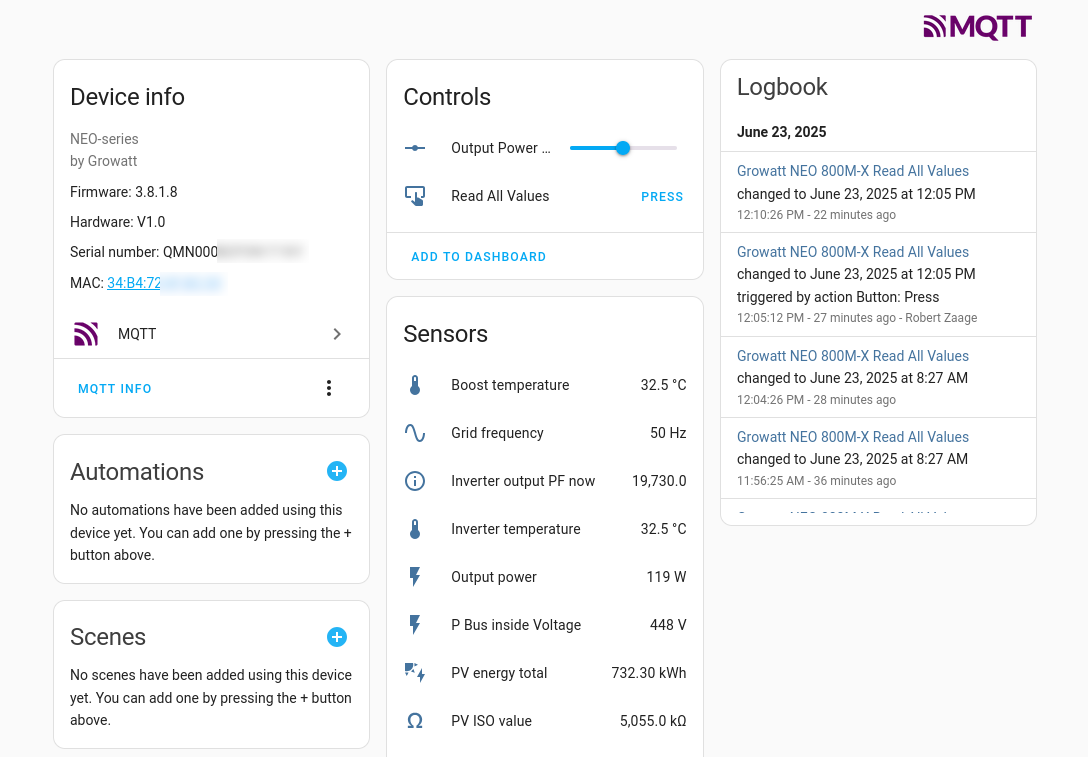
Example of a Growatt NEO 800M-X sending its data to Home Assistant:
- Configure a Mosquitto instance with TLS
- Configure your Growatt device to send its data to this Mosquitto instance
- Run GroBro as Home Assistant add-on or container
View the Configuration Guide for details.
Mosquitto TLS for Growatt to plain Mosquitto configured in Home Assistant
docker run --rm \
  -e SOURCE_MQTT_HOST=<source-mqtt-host> \
  -e SOURCE_MQTT_PORT=<source-mqtt-port> \
  -e SOURCE_MQTT_TLS=true \
  -e TARGET_MQTT_HOST=<target-mqtt-host> \
  -e TARGET_MQTT_PORT=<target-mqtt-port> \
  -v ./grobro-config:/config \
ghcr.io/robertzaage/grobro:latest-
Click the button below to add this repository to your Home Assistant instance
-
Refresh your add-ons in your
Add-On Storeand search forGroBro -
Click the
Installbutton to install the add-on -
Configure the
GroBroadd-on with your source and target MQTT brokers -
Start the
GroBroadd-on -
Check the logs of the
GroBroadd-on to see it in action


Growatt NEO, NOAH and NEXA devices rely on a TLS-enabled Mosquitto broker to send their packages. The full trust chain must be present, including the root certificate. View the Certificates Guide for setup instructions.
For diagnostic steps, see MQTT and network troubleshooting. The Energy dashboard setup, smart meter readings and the support bundle are explained in Using GroBro in Home Assistant.
Questions? Issues? PRs welcome! Setup, architecture and tests are described in the developer documentation.